Cara cepat menghapus recent document

Untuk menghindari orang lain mengetahui file-file apa saja yang barus saja kita buka, salah satu caranya adalah dengan menghapus recent document. Caranya sebagai berikut :
1. Buka Notepad.
2. Ketikkan : echo y| del C:\windows\recent\*.*
3. Simpan file pada sembarang folder, beri nama (misalnya) hapus.bat. Ingat, ekstensi harus bat.
4. Bikin shortcut file tersebut pada dekstop.
5. Klik kanan shortcut tersebut, pilih Properties.
6. Pindah ke tab Program.
7. Pada bagian Run, pilih Minimized.
8. Beri tanda check pada Close on Exit.
9. Klik OK.

Nah sekarang Anda bisa menghapus recent document dengan cepat, yaitu dengan mengklik shortcut yang telah Anda buat pada desktop.
Share
READMORE
 

Buat Asli in Windows Kamu

Windows Genuine Advantage Validation

Hey friends here is new version Windows Genuine Advantage Validation.
This program helps you to get rid of secuirity messages that your Windows is not protected.

Download :
Here Share
READMORE
 

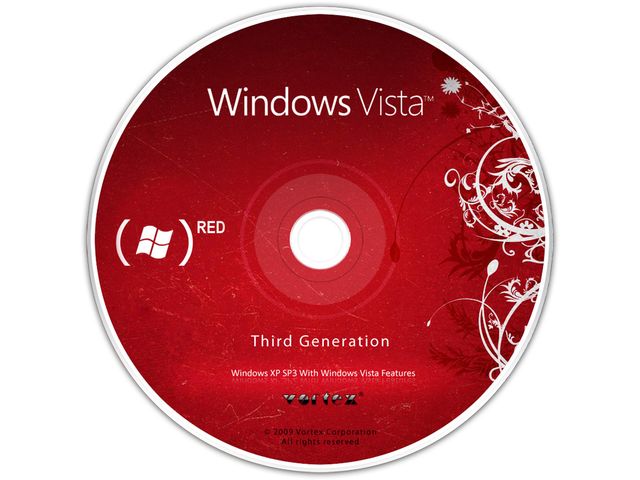
Windows Vortex Vista 3G RED Edition (2009)


System Features
* Windows XP version 5.1 (build 2600.xpsp_sp3_qfe.080814-1300:service pack 3)
* Fully activated 'no activation is needed'
* Microsoft Windows Genuine
* All Microsoft Windows Official Updates until March 2009
* Ability to setup from Hard Disk
* Built-in Serial number
* Vortex Windows Tools version 3.0

Integrated Software
* windows media player 11 with all updates
* Internet explorer 7 with all updates
* DirectX 9.c (4.09.00000.904) for WinXP Post-SP3 November Update
* Microsoft Silverlight v2.0.31005
* flash player 10.0.12.36
* Windows Side bar

Extra Control Panel Features
* BootSafe v2.0.1000
* Bootvis v1.3.37.0
* ClearType PowerToy
* CPU-Z v1.50
* Dial-a-Fix v0.60.0.24
* Expired Cookies Cleaner v1.02
* GPU-Z v0.3.1
* HD Tune v2.55
* HWmonitor v1.13
* MemTest v3.8
* Microsoft AutoPlay Repair Wizard
* Microsoft TimeZone <-- Requires .NET Framework * Microsoft Virtual CD-ROM Control Panel v2.1 * MSI CleanUp Utility 4.4 * New MSConfig * Regedit * Startup v2.8 CPL * Services and Devices v2.7 * Smart Driver Backup v2.12 * TweakUI PowerToy v2.1 * Windows Task Manager * WinUpdatesList v1.23 * User Accounts 2 CPL


Download :
Here
Share
READMORE
 

Extreme Se7en 2010 XGamer - SP3 - x86 - Final - October 2009 Genuine

Supports ALL DEFAULT Languages and Keybroads"
"Supports RAID/SATA drivers"
Release Notes:
Type ]...........[ OS
Source ].........[ Windows XP Professional - RETAIL
Service Pack ],,,[ 3
System ].........[ x86 (32-Bit)
Release Name ]...[ Extreme Se7en 2010 XGamer
File Name ]......[ [WinXP] Extreme Se7en 2010 XGamer [F!nal SP3] Created By Jcberry526 [CW OS Team]
File Format ]....[ .ISO
Year ]...........[ 2009
Serial key ].....[ NOT NEEDED
Creater ]........[ Hotfilmvn.net (CW OS TEAM)
E-mail ].........[ hotfilmvn@gmail.com
ISO Size ].......[ 661MB
RAR Size ].......[ 606MB

Recommended Spec:
Ram ]............[ 256MB
Hard Drive ].....[ 5GB
CD Drive ].......[ YES

Tweaks:
there has been many reg tweaks added
(ALOT FASTER THEN "ES09 XGAMER DX10")

Pre-installed Addons:
Firefox 3.5
Windows 7 Appz
Adobe Flash Player
CCleaner
Google Chrome
Foxit Reader 2
Internet Explorer 8
NET. Framework ALL-IN-ONE
UltraISO
UNi Extract
VLC Player
Workpad 2009
WinRAR 3
Windows Media Player 11 (WMP12 Edition)
... AND MORE


1. Unrar and burn ISO File with Nero/UltraISO
2. License key integrated.
3. fresh install only (NO UPGRADE)


Part 1
Part 2
Part 3
Part 4
Part 5

Mirror :
Here Share
READMORE
 

Point Blank


screen shot nya di SINI

langsung aja loe donload gamenya neh

Download :
Point Blank


Share
READMORE
 

Photoshop Tutorial – Vintage Effect pada Photo

Lama juga vakum gak posting di Blog. Sebenarnya ini tutorial lama, hanya saja langkah dan tekniknya saya perbaiki dan tingkatkan lagi. Sengaja saya menggunakan Photoshop CS3 untuk tutorial ini karena beberapa waktu yg lalu saya menginstal CS3 d kompi, tp bagi para pengguna Photoshop CS2 atau sebelumnya gak perlu kawatir, utorial ini bs d terapkan jg kok. Baiknya kita langsung aja ke langkah tutorialnya.

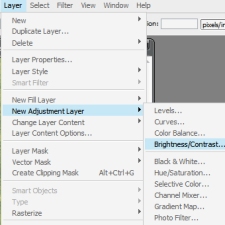
Kita akan melakukan teknik editing tanpa merubah sedikitpun image aslinya. Buka image yg akan di edit. Pilih Layer -> New Adjusment Layer -> Brightness/Contras. Tambahkan Nilai kontrasnya menjadi 30.


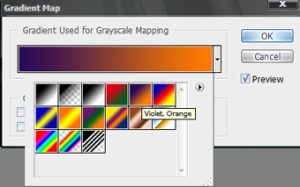
Buat New Gradient Map Layer dengan cara Layer -> New Fill Layer -> Gradient. Pilih gradient Violet, Orange. Kurangi Opacitynya menjadi 15% saja

Layer -> New Adjusment Layer -> Exposure. Atur Nilai Gamma menjadi 0.80.


Layer -> New Adjusment Layer -> Brightness/Contras. Ubah nilai Brightness menjadi 19.

Layer -> New Fill Layer -> Solid Color. Isi dengan


Buat lagi, Layer -> New Fill Layer -> Solid Color. Isi dengan warna #00d480. Rubah Mode Layernya ke Overlay dan Opacity 8%
Buat sekali lagi, Layer -> New Fill Layer -> Solid Color. Isi dengan warna #009ced. Rubah Mode Layernya ke Overlay dan Opacity 5%

Buat New Gradient Map Layer. Atur warna gradientnya seperti gambar berikut. Ubah Mode Layernya menjadi Screen dan Opacitynya 25% saja.


Pilih Layer -> New Adjusment Layer -> Brightness/Contras. Tambahkan Nilai kontrasnya menjadi 50.

Doubel Klik pada layer yang bersangkutan jika kita ingin mengubah pengaturannya. Inilah hasil akhir yang didapat, selamat mencoba dan berkreasi…..


Share
READMORE
 

Your Uninstaller! 2010 Pro v7.0.2010.12


Your Uninstaller! uninstaller software is the industry's leading uninstaller software. It's the world's 1st smart DragandUninstall uninstaller software under the Windows platform, works on all Windows versions including Windows 7/Vista/XP/2000/ME/98/95/2003. It's as easy as using the recycle bin. Imagine! Just a drag-drop and the program you don't want will disappear from your computer - as well as everything the unwanted program brings! Your Uninstaller! is a user-friendly way of removing unneeded applications on your computer. It can even remove some annoying spywares! Your Uninstaller! software is a specially designed uninstaller program for both beginning and advanced users. Your Uninstaller! 2008 is extremely very fast and easy to use. It has a unique ability to uninstall items by simply dragging programs' icons into the Your Uninstaller! icon. You may also find the application you want to uninstall through a unique search function.

Download :
Share
READMORE
 

Windows 8 Pre Xtreme Edition x86/x64


What is Windows 8 xTreme ™?
Windows 8 xTreme ™ its a System based on Windows 7 F! Nal:
- Windows 8 xTreme ™ doesn't have any components removed from Original Windows 7 Image so you wont lose any compatibly with software,
hardware or miss any stuff at all.
- Windows 8 xTreme ™ its a Clean Windows 7 Image with a compilation of the best tweaks and a new integrated look ... keeping all new features
like superbar, etc ...
- Windows 8 xTreme ™ has been tested in a real machine with a compilation of over 200 softwares ...
- All default applications are silently installed before StartUp ...
Tweaks:
* UAC Disabled
* Take Ownership
* Show File Extensions
* Automatic Defragmentation with Diskeeper
* New Cmd File to Right Click
* Enabled Search System Folders in Search
* ClearType
* Windows Will Tell You Exactly What it is Doing When it is Shutting Down or is Booting
* Increase Network Throughput
* ... many tweaks for IE8
* ... many more tweaks for W7 ...
Design:
* New Windows 7 Themes
* New Start Button
* New Cursor 3D
* New Hd Wallpapers
* New Hd System Icons Integrated In System
* New User Account Pics
* New Windows Scheme Sounds
* New Logon Screen
* ... and more

Extra Toos Integrated In System:
* SPTD
Extras:
* Cursor Fx + Cursor 3D (separate optional)
MD5: DDCD1F82FBA14134537F63E00C9E51BC


Download :
Part 1 Share
READMORE